View Cart

call us: (877) ENFIG-411
RadioMP3Mobile PhoneGPSSecuritySatelliteOther
Aftermarket Radios Radio Installation Products Amplifier Installation Products Antennas Video Interfaces
iPod Aux Aux Universal Device Holders Dash Mounts Replacement iPod Cables
Bluetooth
Portable Navigation Systems
Accessories
XM Radios Sirius Radios Aux & Charging Adapters
Dash Mounts


Audi A6 2005 2006 2007 2008 2009 iPod iPhone iPad AUX & USB Car Interface Adapters


These are all the products we sell to connect an iPod AUX or USB stick in your A6. Make sure to look at the bottom of the page for a detailed guide with installation & demonstration videos.
2POINT5_AUDIC6V2I_small.jpg 2point5 spec.dock AUDIC6V2I  
Audi A6 2005-2008 custom dock with interface specific iPod cable  
$149.99    

DENSION_AVRG5A1_100.jpg Dension AVRG5A1  
Dension Audi Video Unit for use with the Dension Gateway 500. Car must have a factory installed TV Tuner.  
$249.99$199.99    

DENSION_BTA_100_SMALL.jpg Dension BTA-1500  
Bluetooth adapter for the Dension Gateway 500  
$149.99$99.99    

DENSION_EXT1IP8_small.jpg Dension EXT2IP9  
"iPod Cable Extension for Dension Gateway 100, 300 & 500 Units 6ft(2m)"  
$19.99    

DENSION_EXT1IP8_small.jpg Dension EXT4IP9  
"iPod Cable Extension for Dension Gateway 100, 300 & 500 Units 14.5ft(4.5m)"  
$39.99    

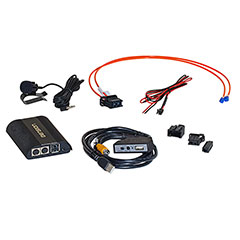
DENSION_GW51MO2_SMALL.jpg Dension GW51MO2 Gateway 500 Ice Llink Audi Porsche Mercedes Volvo BMW Mini  
The Dension GW51MO2 Audi Porsche Mercedes Volvo XC90 or BMW Fiber optic iPod, USB and AUX auxiliary input adapter  
$549.99$429.99    

DENSION_IPO3CR9_SMALL.jpg Dension IP34CR9  
Dension Dock Cradle for Gateway 100 300 400 & 500 Systems  
$44.99$34.99    

DENSION_IP51CR9_100.jpg Dension IP51CR9  
iPod dock for 9 Pin Dension Gateway 100/300/500 units  
$39.99$34.99    

DENSION_IPO4DC9_100.jpg Dension IPO4DC9  
iPod cable for use with current Dension Gateway 100, 300 & 500 units. (contact us if your unit is not current)  
$39.99$34.99    

DICE_DCR_50_100.jpg Dice DCR-50 Cradle  
Universal iPod cradle for iPhone, iPhone3G, iPhone 3Gs, Touch, 2nd gen Touch, 80GB Classic & 160GB Classic  
$59.99$53.99    

ENFIG_35RCA_6_small.jpg Enfig 35RCA-6  
This 6 foot cable converts a 3.5MM (Headphone) stereo output into an set of RCA cables.  
$5.99$2.99    

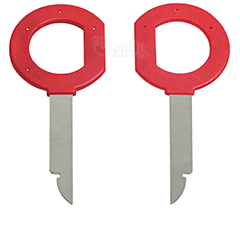
86_9001_small.JPG Metra 86-9001  
Radio Removal Tools/Keys for Volkswagen Audi & Mercedes  
$9.99    

METRA_A35_MM_6_SMALL.jpg Metra AXXESS A35-MM-6  
6 Foot 3.5mm to 3.5mm head phone jack male to male cable  
$9.99$5.99    

PANAVISE_705_small.jpg Panavise 705  
Universal holder  
$19.99    

PANAVISE_75102-705_small.jpg Panavise 75102-705  
Dash mount for your iPod holder  
$29.99$21.99    

PROCLIP_853508_small.jpg ProClip 853508  
Audi A6 2005-2009 Angled Mount  
$29.99$26.99    

AAMP_ISIMPLE_IS335_100.jpg iSimple IS335  
Dash panel mount Aux Input port  
$19.99    

Audi iPod guide A6 2005 2006 2007 2008 2009

We sell and install everything on this page at out store in NJ.
We ship worldwide.

We offer lifetime technical support for you and/or your installer.  But do not offer any support for units not purchased from us.  We have installed over 500 of these units and sold thousands worldwide. No one knows how these units work in your A6 better then us except the guys at Dension.

Here at Enfig Car Stereo we answer the same questions every day so I figured that if I made this guide it would clarify most of the questions and let us get back onto the forums. We specialize in Volkswagen & Audi. We also carry all the relevant iPod interfaces on the market and have been selling Auxiliary AUX interfaces for over 10 years since they were just used for people who wanted a direct audio input for their in-car TV's. PLEASE READ THIS ENTIRE PAGE BEFORE CALLING US WITH QUESTIONS . It will help you make the best decision as to what interface you need and help keep us from answering repetitive questions. But if you do have questions after reading this please feel free to call us. We will be more than happy to speak to you.

Lets start with the car.
A6 2005 2006 2007 2008 2009 (yes it works with the years that the dealership has nothing for)

What type of audio system you have does not matter with the 2005-2009 A6. All of these cars have a CD changer in the glove box.  The adapter connects to the fiber optic cables behind the CD changer.  The only other connection needed is a constant +12V and ground (for power).  These connections can be made at the passenger side fuse box without cutting any wires or making any permanent modifications to the vehicle.  This unit will not have any effect on any existing system in the car including factory Blue Tooth, navigation and satellite Radio.

Dension GW51M02

The unit includes the main unit (silver box), iPod Cable (blue connector), 2 pairs of fiber optic cables (orange), aux/switcher box, power cable (red & black wires) & USB extension cable.

Audi Dealership Setting: The switcher box turns off the Dension unit.  When you need to take your car in for service put the switch into the off (empty circle) position and the Dension unit will disappear off the fiber optic loop.  This will prevent any interference with the Audi diagnostic equipment.

Aux audio input:  The switcher box also has red & white RCA ports.  This is a direct audio input that can be connected to your phone, rear seat TV's or just about anything you can imagine.  I have a customer that connects his DJ equipment to the port so he can perform in parking lots out of his trunk.

USB:  This unit has a dual purpose USB port.  It will be used to update the software in the unit in under 5 minutes using a portable memory stick with software downloaded off the Dension site.  It can can also play music copied onto a Portable memory stick or hard drive. ID tags will be displayed on the display on the center of the dash.

iPod cable:  The iPod cable will charge your iPod (see the web site for supported models). It will transfer CD quality music & data to your cars audio system. In iPod GW mode this unit will let you see all the the song info from your iPod on the screen in your center console and offer full iPod control from the radio controls. The iPod controls are locked out in this mode. In iPod UI mode you have full control from the iPod but no text on the radio. Its an apple limitation.  You can also use your internet radio stations in this mode.  This mode allows song up & down controls of the iPod from the radio & Steering wheel controls. See the following page for more info on audio quality http://www.ilounge.com/index.php/faqs/answers/which-bitrate-should-i-choose

Power cable: The power cable supplies the Dension brain with power.

Fiber optic cables: These cables carry all the data & audio from the Dension brain to your audio system.

Below is a video that demonstrates how the unit works in your A6 (4 Years old)

This is a newer video in an Q7.  The function is the same but it is a better demonstration.

Installation

I usually get power from the top row of the fuse box.  There are usually a few open fuses that you can tap into.  I put a spade connector on the end of a fuse holder and connect the other end of the fuse holder to the red Dension power cable.  I use the bolt that holds the bottom of the fuse box as a ground.  This way the entire unit can be taken out of the car without any evidence of the unit being installed.  The wires can be run to the back of the CD changer without having remove the glove box.

There is a pocket directly to the right of the CD changer.  On the back top left & right there are holes that fit the round end of the iPod cable perfectly.  We also sell a few dash mounts and an ashtray mount. (see below for more info)

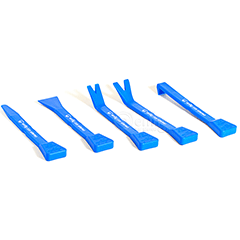
I usually mount the aux/switcher box and the USB extension cable to the bottom of the glove box.  If you look under the glove box there is a black plastic panel that just snaps off.  I take it out of the car and mount them on the work bench.  You can also tuck them behind the top of the passenger side carpet if you don't think you are going to use them regularly.

Now to get the the fiber optic cables on the back of the CD changer I usually take out the CD changer.  You can also just disconnect the CD changer connections from underneath the glove box once you take out the black plastic panel.

Follow the wiring instructions in the installation manual for the fiber optic connections and connections at the Dension brain.

I mount the main unit to a plastic grid directly behind the CD changer using long Zip Ties.

Below are the keys you will need to take out the CD changer.

Metra 86-9001

Below are YouTube videos that show the entire installation.

Mounting

Most of my customers leave their iPod in the glove box.  If you only have an iPhone or perfer to control your iPod using the iPod controls you may want your iPod to be easily accessible.  We offer an ashtray mount and a few mounts. Or lest face it the spec.dock does look pretty cool.  The dash mounts just give you a mounting surface so you don't have to make holes on your dashboard.  Look at our iPod holders for ways to mount your iPod at the following link: http://enfigcarstereo.com/shopsite_sc/store/html/ipod_holders.html

2point5 spec.dock AUDIC6V2I

The spec.dock is the cleanest way to mount your iPod.  It replaces your ashtray and gives you the cleanest possible way to mount your iPod.

http://enfigcarstereo.com/shopsite_sc/store/html/2POINT5_AUDIC6V2I.html

Click here for installation instructions: http://www.tunertricks.com/guides/install_pdfs/audi/A6_install.pdf

Here are the rest of the mounts that attach to your dash board. Remember they are just mounts and require an iPod or device holder.

Panavise 75102-705

Click Here for installation instructions: http://panavise.com/pdf_indash/75102-705.pdf

ProClip 853480

Click here for installation instructions: http://www.proclipusa.com/media/documents/pdf/853480.pdf

ProClip 853508

Click here for installation instructions: http://www.proclipusa.net/media/documents/pdf/853508.pdf


Thanks for reading and let me know if I forgot something,
Christian
info@enfig.com
888-Yo-Enfig (Not a joke we actually got it )
888-963-6344

BizRate Customer Certified (GOLD) Site HACKER SAFE certified sites prevent over 99.9% of hacker crime.
SSL Certificate